

OWL Component Creator
The OWL Component Creator automates the generation of Odoo Web Library (OWL) structures. It standardizes the creation of JavaScript, XML, and CSS/SCSS files while ensuring proper registration within the Odoo manifest and dependency management.
How to Use
To initialize a new OWL component:
- Right-click on a valid Odoo module directory in the VS Code explorer.
- Select Assista Odoo -> OWL Components.
- Select the desired Component Type from the dropdown menu.
- Enter the technical Name for the new component and press Enter.
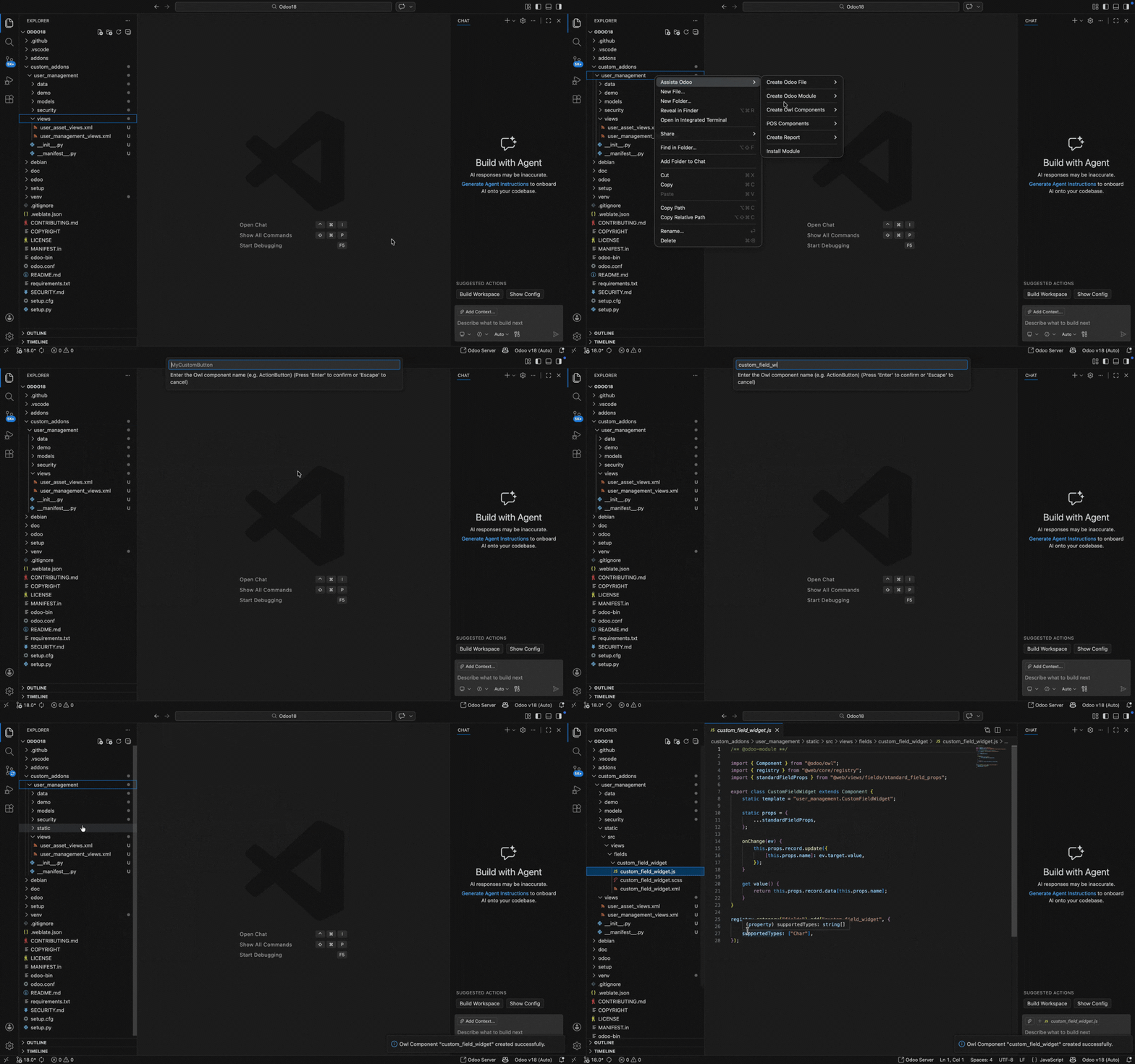
The plugin automatically:
- Generates the required file structure (JS, XML, CSS).
- Registers the new files in the module's
__manifest__.pyunder the appropriate asset bundles. - Includes mandatory dependency modules in the JavaScript definition.
Supported Component Types
1. Common Component
A standard OWL component scaffold for general UI development.
- Output: Generates a standard JS class extending
Component, an associated XML template, and a CSS/SCSS file. - Usage: Ideal for internal module UI elements and standalone widgets.
Structure:
text
module_root/
└── static/
    └── src/
        └── components/
            └── component_name/
                ├── component_name.js
                ├── component_name.xml
                └── component_name.scss
2. Field Widget Component
Specialized scaffold for creating custom Odoo fields.
- Output: Generates a component registered in the
fieldsregistry. - Logic: Includes a pre-configured basic field widget structure.
- Usage: Can be utilized directly via the
widgetattribute in Odoo field tags within XML views.
Structure:
text
module_root/
└── static/
    └── src/
        └── views/
            └── fields/
                └── component_name/
                    ├── component_name.js
                    ├── component_name.xml
                    └── component_name.scss
3. Public Component
Designed for Odoo Website and frontend portal customization.
- Output: Generates a component registered in the
public_componentsregistry. - Usage: Accessible from website templates using the
nameattribute withint-componenttags.
Structure:
text
module_root/
└── static/
    └── src/
        └── components/
            └── component_name/
                ├── component_name.js
                ├── component_name.xml
                └── component_name.scss
4. OWL Service
A scaffold for creating global Odoo services.
- Output: Generates a service definition registered in the
serviceregistry. - Usage: Used for managing global state or providing shared logic across multiple components and controllers.
Structure:
text
module_root/
└── static/
    └── src/
        └── service/
            └── service_name/
                └── service_name.js
For standards-compliant OWL development practices, refer to the Odoo Web Library Documentation.