

File creator
Create Odoo Python, XML and CSV files from the project view. Each template is pre-filled with the imports and boilerplate Odoo expects, and new files are registered in __init__.py or __manifest__.py for you.
What you can do
| Type | Templates |
|---|---|
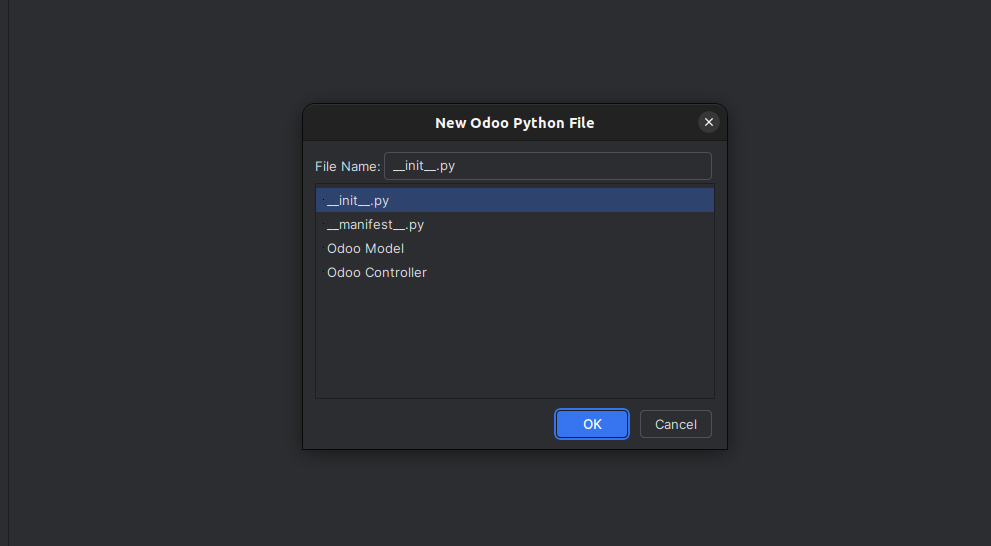
| Python | __init__.py, __manifest__.py, Odoo Model, Odoo Controller |
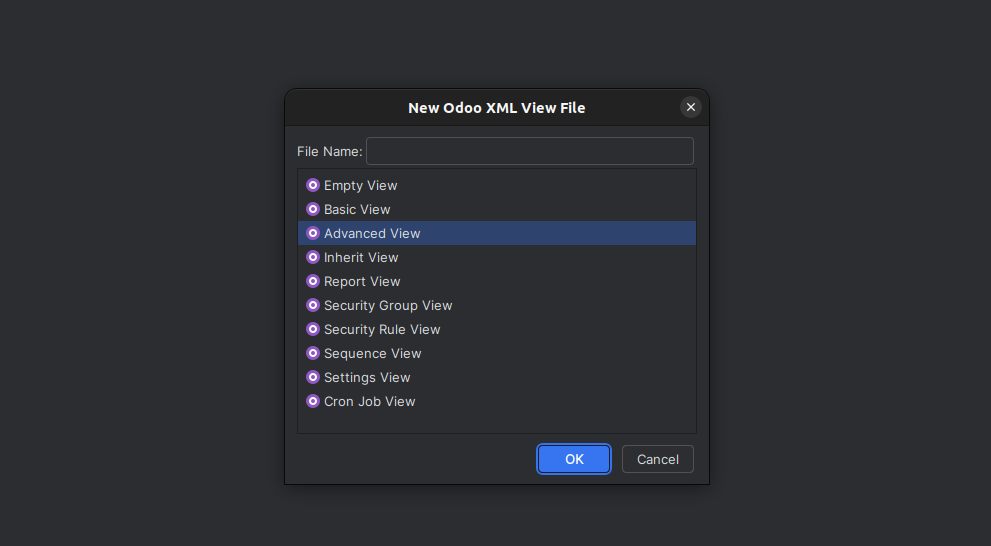
| XML | Empty View, Basic View, Advanced View, Inherit View, Report View, Security Group View, Security Rule View, Sequence View, Settings View, Cron Job View |
| CSV | Security file (ir.model.access.csv) |
Get started
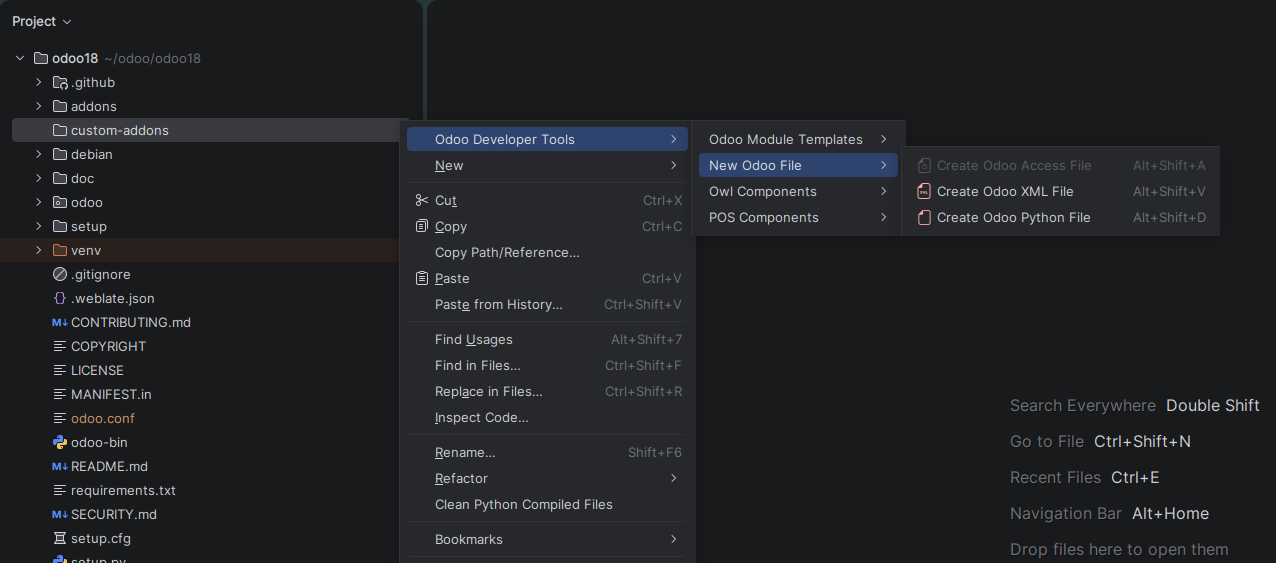
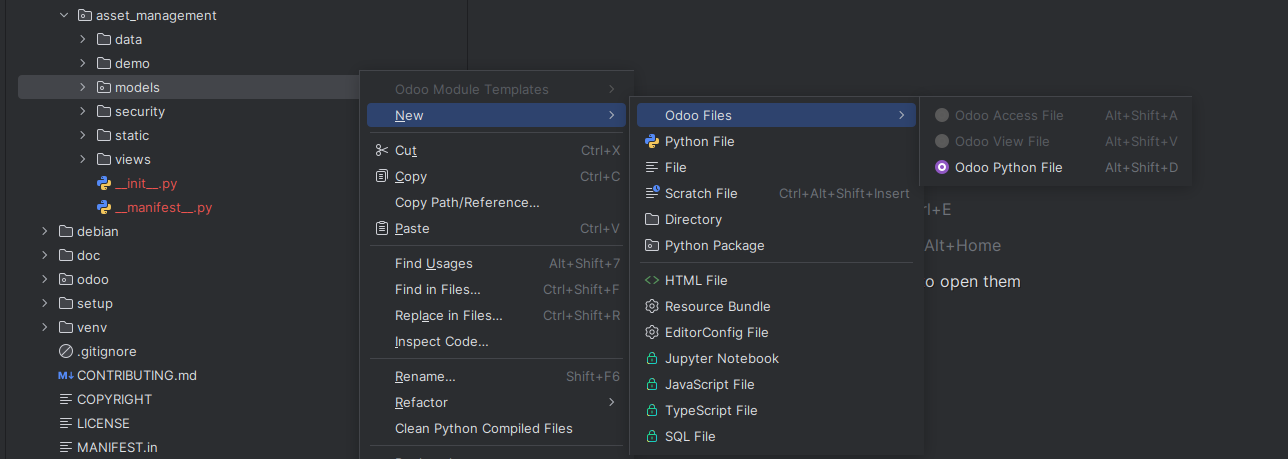
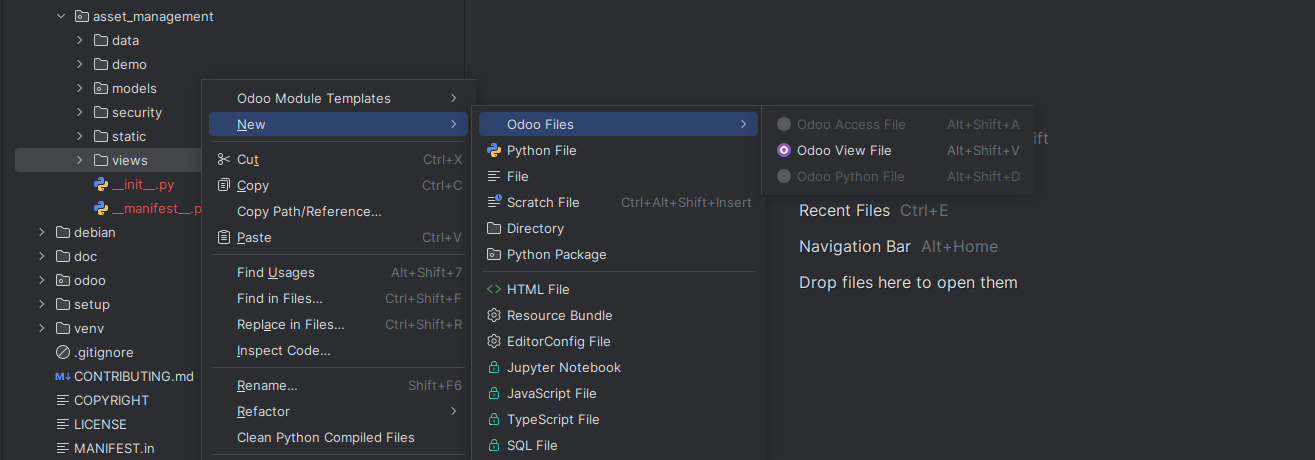
- Right-click the folder where you want the file.
- Select Odoo Developer Tools > New Odoo File. You can also use New > Odoo Files.
- Choose Create Odoo Python File, Create Odoo XML File or Create Odoo Access File.
- In the dialog, enter the File Name, select a template and select OK.
Shortcuts
| Action | Windows and Linux | macOS |
|---|---|---|
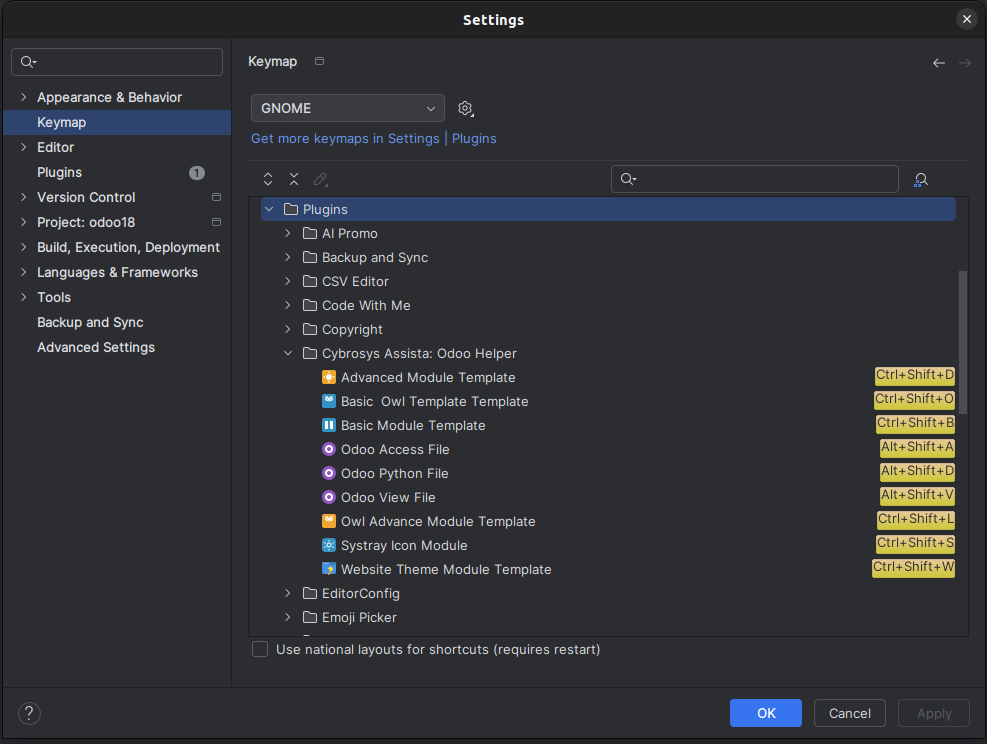
| Open Odoo File Creation Menu | Alt+Shift+F | Cmd+Shift+F |
| Create Odoo Model (Python) File | Alt+Shift+D | Cmd+Shift+D |
| Create Odoo View (XML) File | Alt+Shift+V | Cmd+Shift+V |
| Create Odoo Access File | Alt+Shift+A | Cmd+Shift+A |
To change a shortcut:
- Open Settings (or Preferences on macOS).
- Select Keymap in the left sidebar and expand Plugins.
- Expand Cybrosys Assista: Odoo Helper and find the action.
- Right-click the action and choose Add Keyboard Shortcut.
- Press your key combination and apply the change. You can also remove or reassign a conflicting shortcut from the same menu.
Python templates
| Template | Generates |
|---|---|
__init__.py | An initialization file with the encoding declaration and import placeholders. |
__manifest__.py | A ready-to-edit manifest with standard metadata (name, version, category, summary, description, author, website), dependencies and data files. |
| Odoo Model | A model file with the required imports, a sample model class, fields and a basic create method. |
| Odoo Controller | A controller file with imports, a controller class and a sample @http.route method for a web or API endpoint. |
__init__.py
# -*- coding: utf-8 -*-
from . import models
from . import controllers
Odoo Model
# -*- coding: utf-8 -*-
from odoo import api, fields, models


class ModelName(models.Model):
    """ This model represents model.name."""
    _name = 'model.name'
    _description = 'ModelName'

    name = fields.Char(string='Customer Name', required=True)
    active = fields.Boolean(default=True)

    @api.model_create_multi
    def create(self, vals):
        """Override the default create method to customize record creation logic."""
        return super().create(vals)
Odoo Controller
# -*- coding: utf-8 -*-
from odoo import http
from odoo.http import request


class MainController(http.Controller):
    """Controller class to handle HTTP routes."""
    @http.route('/main', auth='public', website=True)
    def index(self, **kw):
        return request.render('your_module.template_id', {'sample_data': 'Sample Data'})
XML templates
| Template | Generates |
|---|---|
| Empty View | A blank <odoo> file for custom configuration or advanced use. |
| Basic View | A form view, a list view, a window action and a menu item for one model. |
| Advanced View | Form view with a header, statusbar and notebook, list view with row decorations, search view with filters and group by, calendar view, kanban view, window action and menu item. |
| Inherit View | Form and list view extensions with <xpath> examples for inside, before, after, replace and attributes. |
| Report View | A PDF report action and QWeb templates with a header block, a lines table and totals. |
| Security Group View | User and Manager groups, where Manager inherits User through implied_ids, and a demo user in the User group. |
| Security Rule View | Access rights and record rules for the User and Manager groups. |
| Sequence View | An ir.sequence record in a noupdate block, with code, prefix, padding and company. |
| Settings View | An extension of the res.config.settings form for your module settings. |
| Cron Job View | An ir.cron scheduled action in a noupdate block, with the model, code to run and interval. |
The examples below show the shape of the main templates. Names such as model.name are placeholders that you replace.
Basic View
<?xml version="1.0" encoding="utf-8"?>
<odoo>
    <!-- Form View -->
    <record id="model_name_view_form" model="ir.ui.view">
        <field name="name">model.name.view.form</field>
        <field name="model">model.name</field>
        <field name="arch" type="xml">
            <form string="Model_name">
                <sheet>
                    <group>
                        <field name="name"/>
                        <!-- Add your fields here -->
                    </group>
                </sheet>
            </form>
        </field>
    </record>

    <!-- List View -->
    <record id="model_name_view_list" model="ir.ui.view">
        <field name="name">model.name.view.list</field>
        <field name="model">model.name</field>
        <field name="arch" type="xml">
            <list string="Model_name">
                <field name="name"/>
            </list>
        </field>
    </record>

    <!-- Action -->
    <record id="model_name_action" model="ir.actions.act_window">
        <field name="name">Model name</field>
        <field name="res_model">model.name</field>
        <field name="view_mode">list,form</field>
        <field name="help" type="html">
            <p class="o_view_nocontent_smiling_face">
                Create your first model name!
            </p>
        </field>
    </record>

    <!-- Menu -->
    <menuitem id="model_name_menu"
              name="Model name"
              action="model_name_action"
              sequence="10"/>
</odoo>
Advanced View (form header, kanban and search)
<form string="Model_name">
    <header>
        <button name="action_confirm" string="Confirm" type="object" class="oe_highlight"/>
        <button name="action_cancel" string="Cancel" type="object"/>
        <field name="state" widget="statusbar" statusbar_visible="draft,confirmed,done"/>
    </header>
    <sheet>
        <div class="oe_title">
            <h1><field name="name"/></h1>
        </div>
        <notebook>
            <page string="General Information">
                <group>
                    <group>
                        <field name="field1"/>
                        <field name="field2"/>
                    </group>
                    <group>
                        <field name="field3"/>
                        <field name="field4"/>
                    </group>
                </group>
            </page>
            <page string="Lines">
                <field name="line_ids">
                    <list editable="bottom">
                        <field name="name"/>
                        <field name="quantity"/>
                        <field name="price"/>
                        <field name="subtotal" sum="Total"/>
                    </list>
                </field>
            </page>
            <page string="Notes">
                <field name="notes"/>
            </page>
        </notebook>
    </sheet>
    <chatter/>
</form>
The list view uses row decorations such as decoration-info="state=='draft'". The search view has filters for each state and a Group By block on state and creation date. In Odoo 18, the kanban view uses the card template:
<kanban default_group_by="state" class="o_kanban_small_column" sample="1">
    <templates>
        <t t-name="card">
            <field name="name" class="fw-bold"/>
            <field name="field1"/>
            <field name="field2"/>
        </t>
    </templates>
</kanban>
Inherit View
<record id="model_name_view_form" model="ir.ui.view">
    <field name="name">model.name.view.form.inherit.module</field>
    <field name="model">model.name</field>
    <field name="inherit_id" ref="module.original_form_view_id"/>
    <field name="arch" type="xml">
        <!-- Add fields to an existing group -->
        <xpath expr="//group[1]" position="inside">
            <field name="new_field1"/>
        </xpath>

        <!-- Add a new page to the notebook -->
        <xpath expr="//notebook" position="inside">
            <page string="New Page">
                <group><field name="new_field3"/></group>
            </page>
        </xpath>

        <!-- Modify an existing field -->
        <xpath expr="//field[@name='existing_field']" position="attributes">
            <attribute name="readonly">1</attribute>
            <attribute name="string">New Label</attribute>
        </xpath>

        <!-- Replace a field -->
        <xpath expr="//field[@name='to_replace']" position="replace">
            <field name="replacement_field"/>
        </xpath>

        <!-- Add before or after a field -->
        <xpath expr="//field[@name='reference_field']" position="before">
            <field name="before_field"/>
        </xpath>
        <xpath expr="//field[@name='reference_field']" position="after">
            <field name="after_field"/>
        </xpath>
    </field>
</record>
Security Group and Security Rule
<!-- Security Group View -->
<record id="module_name_group_user" model="res.groups">
    <field name="name">Module name groups User</field>
    <field name="category_id" ref="base.module_category_hidden"/>
    <field name="comment">Basic access to Module name groups</field>
    <field name="implied_ids" eval="[(4, ref('base.group_user'))]"/>
</record>

<record id="module_name_group_manager" model="res.groups">
    <field name="name">Module name groups Manager</field>
    <field name="category_id" ref="base.module_category_hidden"/>
    <field name="comment">Full access to Module name groups</field>
    <field name="implied_ids" eval="[(4, ref('module_name_group_user'))]"/>
</record>

<!-- Security Rule View: record rule for users -->
<record id="model_name_rule_user" model="ir.rule">
    <field name="name">model.name: Users access only their own records</field>
    <field name="model_id" ref="model_model_name"/>
    <field name="domain_force">[('create_uid', '=', user.id)]</field>
    <field name="perm_unlink" eval="0"/>
    <field name="groups" eval="[(4, ref('module_name_group_user'))]"/>
</record>
The Security Rule View template also creates ir.model.access records for both groups, and a manager rule with the domain [(1, '=', 1)] and full permissions. Users can read, write and create only their own records. Managers have full access, including delete.
Sequence View and Cron Job View
<data noupdate="1">
    <record id="seq_ir_sequence_data" model="ir.sequence">
        <field name="name">Ir sequence data Sequence</field>
        <field name="code">ir.sequence.data</field>
        <field name="prefix">IR_/%(year)s/</field>
        <field name="padding">5</field>
        <field name="company_id" eval="False"/>
    </record>
</data><data noupdate="1">
<record id="ir_cron_ir_cron_data" model="ir.cron">
<field name="name">Ir cron data Scheduler</field>
<field name="model_id" ref="model_ir_cron_data"/>
<field name="state">code</field>
<field name="code">model.method_to_run()</field>
<field name="interval_number">1</field>
<field name="interval_type">days</field>
<field name="active" eval="True"/>
</record>
</data>CSV template
The Security File template creates ir.model.access.csv with the header and a sample access line: model, group and the read, write, create and delete permissions.
id,name,model_id:id,group_id:id,perm_read,perm_write,perm_create,perm_unlink
access_model_name_user,access.model.name.user,model_model_name,base.group_user,1,1,1,1
Automatic registration
When you create a file, the plugin updates your module for you:
| File | Updated |
|---|---|
| Model | The import is added to models/__init__.py. |
| Controller | The import is added to controllers/__init__.py. |
| View (XML) | The file is added to the data key in __manifest__.py. |
This removes manual edits and the errors that come with them, such as a missing import or a data file missing from the manifest.
Context-aware creation
The plugin checks where you create a file and only offers templates that fit.
- Models go in
models/and controllers incontrollers/. - Views (form, list, search, kanban) go in
views/. - Module templates can only be created inside valid addons folders.
- The menu shows only the relevant templates for the folder, and disables the entries that do not apply.
Tips and limits
- Use lowercase names with underscores for Python files, and descriptive names for XML files. Follow Odoo's naming conventions.
- Keep related files together, in the matching subfolder.
- Choose the closest template, then remove template code you do not need.
- Create files in the correct folders so the menu offers the template you want.
- Generated code is a starting point. Check it against the Odoo version you target.
Next steps
- Module templates for complete modules
- Snippets
- Code inspection