

Snippets
Insert Odoo fields, decorators, methods, views, buttons and menus by typing a snippet prefix in a Python or XML file.
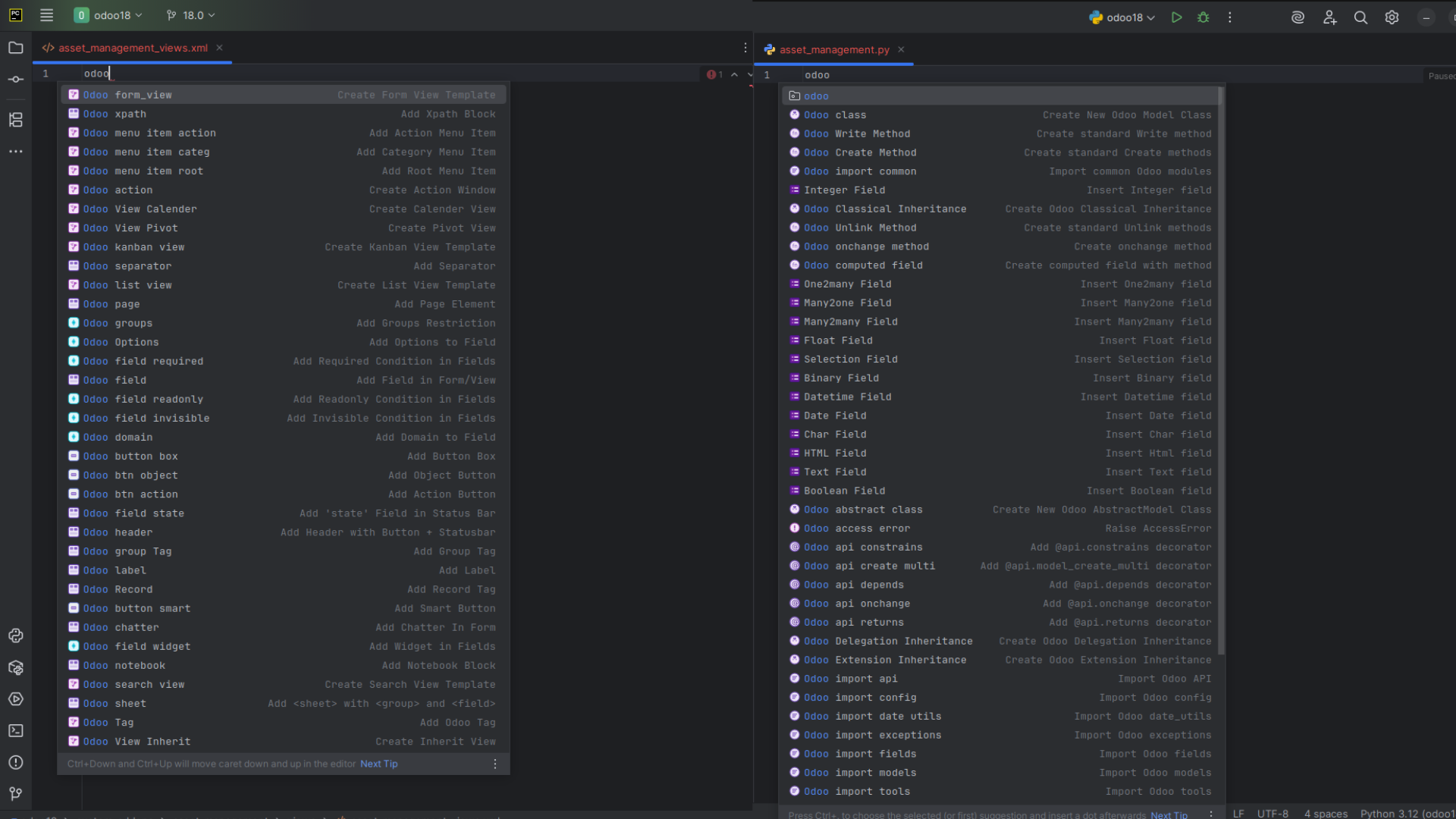
What you can do
All prefixes start with odoo. Type odoo in a Python or XML file to see the list of snippets with their descriptions. Select one, or type the full prefix, and press Enter to insert it. Replace the placeholder values after the snippet is inserted.
For snippets that create views, actions, menus or security records, the plugin uses the model of your current context to fill in model names and record IDs where it can.
Get started
- Open a Python or XML file in your Odoo module.
- Type
odooand select a snippet. - Edit the placeholders.
Python snippets
Fields
| Prefix | Description | Inserts |
|---|---|---|
odoo_field_boolean | Create Boolean field | fields.Boolean(string='Active') |
odoo_field_char | Create Char field | fields.Char(string='Name') |
odoo_field_text | Create Text field | fields.Text(string='Description') |
odoo_field_float | Create Float field | fields.Float(string='Amount', digits=(16, 2)) |
odoo_field_integer | Create Integer field | fields.Integer(string='Quantity') |
odoo_field_date | Create Date field | fields.Date(string='Start Date') |
odoo_field_datetime | Create Datetime field | fields.Datetime(string='Timestamp') |
odoo_field_many2one | Create Many2one field | fields.Many2one('model.name', string='Partner', ondelete='restrict') |
odoo_field_one2many | Create One2many field | fields.One2many('model.name', 'inverse_field_name', string='Order Lines') |
odoo_field_many2many | Create Many2many field | fields.Many2many('model.name', string='Tags') |
odoo_field_html | Create HTML field | fields.Html(sanitize=True, string='Content') |
odoo_field_binary | Create Binary field | fields.Binary(attachment=True, string='File') |
odoo_field_selection | Create Selection field | See below |
fields.Selection([
    ('draft', 'Draft'),
    ('done', 'Done')
], string='Status', default='draft')
API decorators
| Prefix | Description | Inserts |
|---|---|---|
odoo_api_create_multi | Add model_create_multi decorator | @api.model_create_multi |
odoo_api_depends | Add depends decorator | @api.depends('field_name') |
odoo_api_onchange | Add onchange decorator | @api.onchange('field_name') |
odoo_api_constrains | Add constrains decorator | @api.constrains('field_name') |
odoo_api_returns | Add returns decorator | @api.returns('model.name') |
Imports
| Prefix | Description | Inserts |
|---|---|---|
odoo_import_fields | Import fields | from odoo import fields |
odoo_import_models | Import models | from odoo import models |
odoo_import_api | Import API | from odoo import api |
odoo_import_tools | Import tools | from odoo import tools |
odoo_import_config | Import config | from odoo.tools import config |
odoo_import_date_utils | Import date_utils | from odoo.tools import date_utils |
odoo_import_common | Import common modules | from odoo import api, fields, models |
odoo_import_exceptions | Import exceptions | from odoo.exceptions import UserError, ValidationError, AccessError, MissingError |
Exceptions
| Prefix | Description | Inserts |
|---|---|---|
odoo_user_error | Raise UserError | raise UserError(_('Error message')) |
odoo_validation_error | Raise ValidationError | raise ValidationError(_('Validation error message')) |
odoo_access_error | Raise AccessError | raise AccessError(_('Access error message')) |
odoo_missing_error | Raise MissingError | raise MissingError(_('Record not found')) |
odoo_redirect_warning | Raise RedirectWarning | raise RedirectWarning(_('Warning message'), action_id, _('Button text')) |
Models and inheritance
| Prefix | Description |
|---|---|
odoo_class | Create a new Odoo model class (models.Model) |
odoo_transient_class | Create a TransientModel class, for wizards |
odoo_abstract_class | Create an AbstractModel class, for shared behavior |
odoo_extension_inheritance | Create an extension inheritance (_name and _inherit) |
odoo_classical_inheritance | Create a classical inheritance (_inherit only) |
odoo_delegation_inheritance | Create a delegation inheritance (_inherits) |
# odoo_class
class ModelName(models.Model):
    _name = 'model.name'
    _description = 'New Model Description'
    _order = 'id desc'  # Default ordering

name = fields.Char()# odoo_delegation_inheritance
class ModelName(models.Model):
_name = 'model.name'
_inherits = {'res.partner': 'partner_id'}
partner_id = fields.Many2one('res.partner', required=True, ondelete='cascade')odoo_transient_class and odoo_abstract_class produce the same layout as odoo_class with models.TransientModel or models.AbstractModel and a wizard or abstract description. odoo_extension_inheritance adds _inherit = 'model.to.inherit' to a class with a _name. odoo_classical_inheritance has only _inherit = 'model.name' and a new field.
Methods
| Prefix | Description |
|---|---|
odoo_create_method | Create a standard create method |
odoo_write_method | Create a standard write method |
odoo_unlink_method | Create a standard unlink method |
odoo_computed_field | Create a computed field with its compute method |
odoo_onchange_method | Create an onchange method |
# odoo_create_method
@api.model_create_multi
def create(self, vals):
    """Create a new record with the given values."""
return super().create(vals)# odoo_computed_field
computed_field = fields.Float(string='Computed Field', compute='_compute_computed_field', store=True)
@api.depends('dependency_field')
def _compute_computed_field(self):
"""Compute the value of the field computed_field."""
for record in self:
record.computed_field = 0.0 # Your computation here# odoo_onchange_method
@api.onchange('field_name')
def _onchange_field_name(self):
"""Triggered when the field_name changes to update related values."""
if self.field_name:
# Your onchange logic here
self.another_field = self.field_nameodoo_write_method and odoo_unlink_method insert write(self, vals) and unlink(self) methods that call super().
Actions and notifications
| Prefix | Description |
|---|---|
odoo_return_action | Return a window action |
odoo_rainbow_man_notification | Show a rainbow man effect |
odoo_warning_notification | Show a warning notification |
odoo_success_notification | Show a success notification |
odoo_info_notification | Show an info notification |
# odoo_return_action
return {
    'type': 'ir.actions.act_window',
    'name': 'Window Title',
    'res_model': 'model.name',
    'view_mode': 'list,form',
    'target': 'current/new',
    'domain': [('field_name', '>', value)],
    'context': {'default_field_name': field_value},
}# odoo_warning_notification (success and info use 'type': 'success' and 'type': 'info')
return {
'type': 'ir.actions.client',
'tag': 'display_notification',
'params': {
'title': _("Warning head"),
'type': 'warning',
'message': _("This is the detailed warning"),
'sticky': True,
},
}# odoo_rainbow_man_notification
return {
'effect': {
'fadeout': 'slow',
'message': f'Message to Display',
'type': 'rainbow_man',
}
}XML snippets
Buttons
| Prefix | Description | Inserts |
|---|---|---|
odoo_btn_object | Add object button | <button name="button_method_name" type="object" string="Button Label" class="btn-primary"/> |
odoo_btn_action | Add action button | <button name="%(action_id)d" type="action" string="Action Button" class="btn-secondary"/> |
odoo_button_smart | Add smart button | A oe_stat_button with an icon and a stat value and text |
odoo_button_box | Add button box | A oe_button_box div that contains a smart button |
<!-- odoo_button_box -->
<div class="oe_button_box" name="button_box">
    <button name="Button Action"
            class="oe_stat_button"
            icon="fa-bars"
            type="object"
            invisible=""
            groups="">
        <div class="o_stat_info">
            <field name="" class="o_stat_value"/>
            <span class="o_stat_text"></span>
        </div>
    </button>
</div>
Field attributes
| Prefix | Description | Inserts |
|---|---|---|
odoo_domain | Add domain to field | domain="[('field_name', '=', value)]" |
odoo_options | Add options to field | options="{'currency_field': 'currency_id'}" |
odoo_groups | Add groups restriction | groups="base.group_user" |
odoo_field_widget | Add widget in fields | widget="" |
odoo_field_invisible | Add invisible condition | invisible="state != 'done'" |
odoo_field_readonly | Add readonly condition | readonly="not can_edit" |
odoo_field_required | Add required condition | required="action == 'exist'" |
odoo_field_state | Add state field in status bar | A state field with the statusbar widget |
View elements
| Prefix | Description | Inserts |
|---|---|---|
odoo_field | Add field in form or list | <field name="field_name" string="Field Label" required="True"/> |
odoo_label | Add label | <label for="field_name" string="Label Text"/> |
odoo_separator | Add separator | <separator string="Section Title"/> |
odoo_chatter | Add chatter in form | <chatter/> |
odoo_notebook | Add notebook block | A <notebook> with one <page> |
odoo_page | Add page element | <page string=""> |
odoo_xpath | Add xpath block | <xpath expr="//div" position="inside"> with a field |
odoo_header | Add header with button and statusbar | See below |
odoo_sheet | Add sheet with group and fields | <sheet> with a <group> and name and description fields |
odoo_record | Add record tag | <record id="" model=""> |
odoo_tag | Add Odoo tag | An XML declaration with an empty <odoo> root |
<!-- odoo_header -->
<header>
    <button name="" string="" class="oe_highlight" invisible="" type=""/>
    <field name="state" widget="statusbar" statusbar_visible=""/>
</header>
View templates
| Prefix | Description |
|---|---|
odoo_form_view | Create form view template |
odoo_list_view | Create list view template |
odoo_search_view | Create search view template |
odoo_kanban | Add kanban view template |
odoo_pivot_view | Create pivot view |
odoo_calender_view | Create calendar view |
Each view template inserts a full ir.ui.view record with name, model and arch fields, named model.name.view.<type>.
<!-- odoo_form_view -->
<record id="model_name_view_form" model="ir.ui.view">
    <field name="name">model.name.view.form</field>
    <field name="model">model.name</field>
    <field name="arch" type="xml">
        <form string="Form Title">
            <header>
                <!-- Buttons and statusbar go here -->
            </header>
            <sheet>
                <div class="oe_title">
                    <h1>
                        <field name="name"/>
                    </h1>
                </div>
                <group>
                    <group>
                        <field name="field1"/>
                        <field name="field2"/>
                    </group>
                    <group>
                        <field name="field3"/>
                        <field name="field4"/>
                    </group>
                </group>
            </sheet>
        </form>
    </field>
</record><!-- odoo_list_view -->
<list string="List Title" decoration-danger="state=='cancel'" decoration-success="state=='done'">
<field name="name"/>
<field name="date"/>
<field name="partner_id"/>
<field name="amount"/>
<field name="state"/>
</list><!-- odoo_search_view -->
<search string="Search Title">
<field name="name" string="Name" filter_domain="[('name','ilike',self)]"/>
<field name="partner_id"/>
<field name="date"/>
<filter string="Draft" name="draft" domain="[('state','=','draft')]"/>
<filter string="Done" name="done" domain="[('state','=','done')]"/>
<separator/>
<filter string="My Records" name="my_records" domain="[('user_id','=',uid)]"/>
<group expand="0" string="Group By">
<filter string="Partner" name="partner" context="{'group_by':'partner_id'}"/>
<filter string="Month" name="month" context="{'group_by':'date:month'}"/>
<filter string="Status" name="status" context="{'group_by':'state'}"/>
</group>
</search><!-- odoo_pivot_view -->
<pivot string="Model Name Pivot">
<field name="name"/>
<field name="state"/>
</pivot><!-- odoo_kanban, as it reads in Odoo 18 -->
<kanban>
<templates>
<t t-name="card">
<field name="name" class="fw-bold"/>
<field name="description"/>
</t>
</templates>
</kanban>Menus, actions and inheritance
| Prefix | Description | Inserts |
|---|---|---|
odoo_menu_item_root | Add root menu item | <menuitem id="module_name_menu_root" name="Module Name" sequence="10"/> |
odoo_menu_item_categ | Add category menu item | <menuitem id="unique_id_menu_categ" name="Model Name" parent="" sequence="10"/> |
odoo_menu_item_action | Add action menu item | <menuitem id="unique_id_menu_categ" name="Model Name" parent="" action="" sequence="10"/> |
odoo_action | Create action window | An ir.actions.act_window record |
odoo_inherit_view | Create inherit view | An ir.ui.view record with inherit_id and an xpath example |
<!-- odoo_action -->
<record id="model_name_action" model="ir.actions.act_window">
    <field name="name">Model Name</field>
    <field name="res_model">model.name</field>
    <field name="view_mode">list,form</field>
    <field name="context">{}</field>
    <field name="help" type="html">
        <p class="o_view_nocontent_smiling_face">
            Create your first record
        </p>
    </field>
</record><!-- odoo_inherit_view -->
<record id="model_name_view_type_view_inherit" model="ir.ui.view">
<field name="name">model.name.view.type.view.inherit</field>
<field name="model">model.name</field>
<field name="inherit_id" ref="module.original_form_view_id"/>
<field name="arch" type="xml">
<!-- Add fields to an existing group -->
<xpath expr="//group[1]" position="inside">
<field name="new_field1"/>
<field name="new_field2"/>
</xpath>
</field>
</record>Tips and limits
- Snippets insert a starting point, not version-specific code. Check the result against your Odoo version. The kanban template changed in Odoo 18, and the list view type is
listfrom Odoo 18. - The prefix
odoo_calender_viewis spelled as the plugin defines it. The calendar template needs the correct<calendar>view tag for your Odoo version, so check it after you insert it. - Modify snippets to fit your project, and add docstrings and comments.
- Name fields descriptively, group related methods together, and think about access rights when you add models and views.