

Smart suggestions
Get completions for Odoo model names, field names, templates, widgets and module dependencies as you type in Python and XML files. Suggestions follow the context of the code, so you see only names that fit.
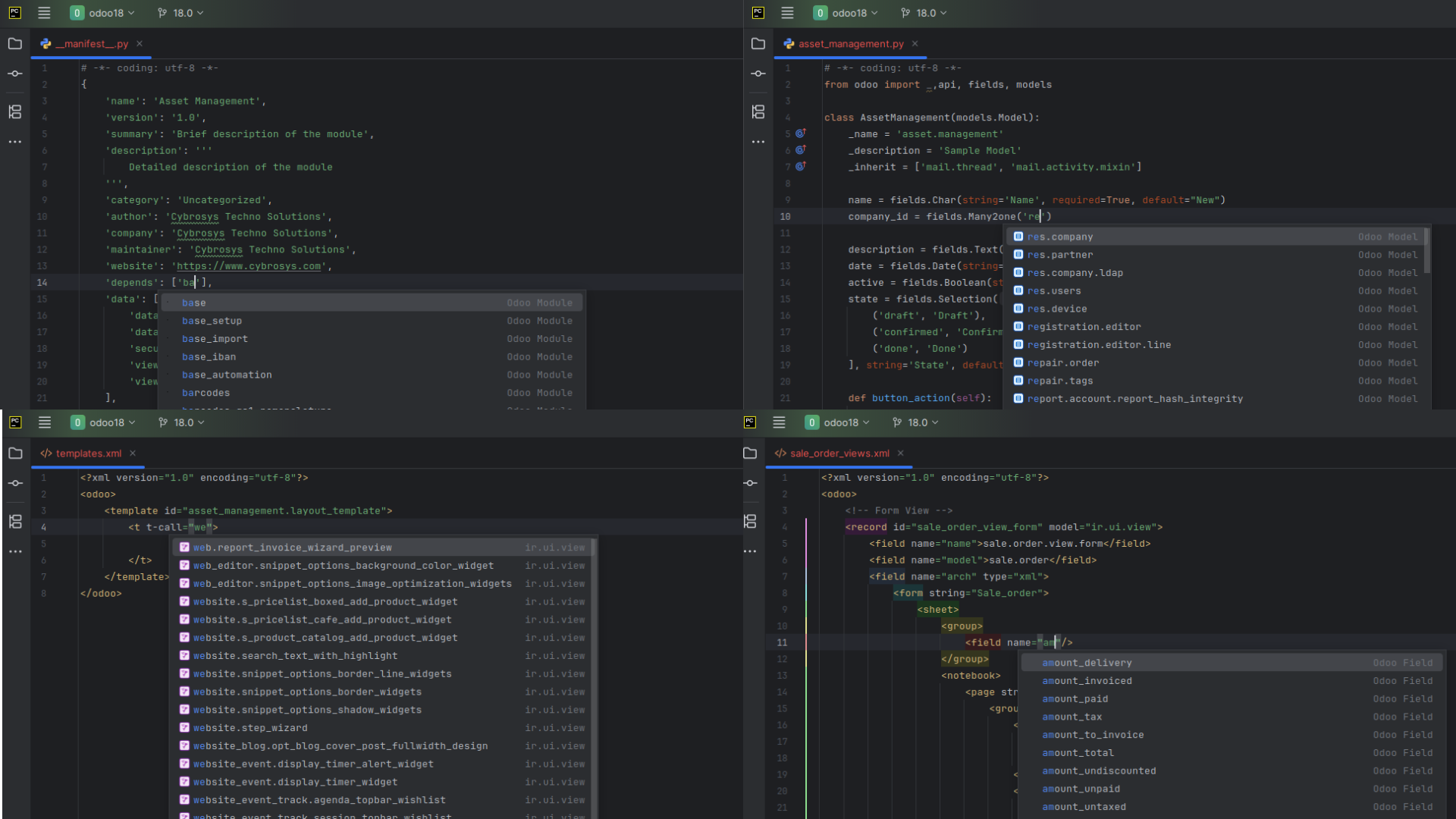
What you can do
In the code samples, | marks the cursor.
Python
| Where | You get |
|---|---|
_inherit (a string or a list) | Model names to extend. |
fields.Many2one(', One2many, Many2many | Model names for the comodel. Positional arguments are supported. |
inverse_name of a One2many field | Relational fields of the comodel. |
self.env[' and request.env[' | Model names. |
@api.depends(', @api.onchange(', @api.constrains(' | Field names of the current model. |
record. and self.mapped(' | Field names, following first-level relational fields. |
depends in __manifest__.py | Module names. |
python
class MyModel(models.Model):
    _inherit = '|'                      # model names

    partner_id = fields.Many2one('|')   # model names
    line_ids = fields.One2many('model.name', '|')   # inverse field names

    @api.depends('|')                   # field names
    def _compute_total(self):
        self.env['|']                   # model names
        self.mapped('|')                # field names
python
# __manifest__.py
{
    'depends': ['|'],                   # module names
}
XML
| Where | You get |
|---|---|
The model attribute of <record> | Model names. |
<field name="model"> and <field name="res_model"> values | Model names. |
The name attribute of <field> in a view | Field names of the view's model. |
The t-call attribute | Template names, including those from other modules. |
The widget attribute | Widgets. |
The class attribute of a field | CSS classes declared in your project. |
xml
<record model="|" id="view_id">                  <!-- model names -->
    <field name="model">|</field>                <!-- model names -->
    <field name="arch" type="xml">
        <form>
            <field name="|"/>                    <!-- field names of the model -->
            <field name="name" widget="|"/>      <!-- widgets -->
            <field name="name" class="|"/>       <!-- CSS classes from your project -->
        </form>
    </field>
</record>

<t t-call="|"/>                                  <!-- template names -->
Get started
- Open an Odoo project and let PyCharm finish indexing.
- Start typing in a Python or XML file, or press
Ctrl+Spaceto open the suggestions. - Press
Tabto accept a suggestion andEscto dismiss the list.
Tips and limits
- Suggestions depend on PyCharm's index. If names are missing, wait for indexing to finish, or choose File > Invalidate Caches and restart.
- Field suggestions follow the model of the current context, so they differ from one class or view to the next. Python and XML each get their own set of suggestions.
- Use suggestions to discover the models and fields that exist, and to avoid typos in names.