

Odoo Connectivity
Odoo Connectivity allows you to link the Assista extension directly to your running Odoo development instance. This connection enables you to manage your modules—installing or upgrading them—without leaving VS Code.
How to Setup the Connection
To connect to your Odoo server, follow these stages:
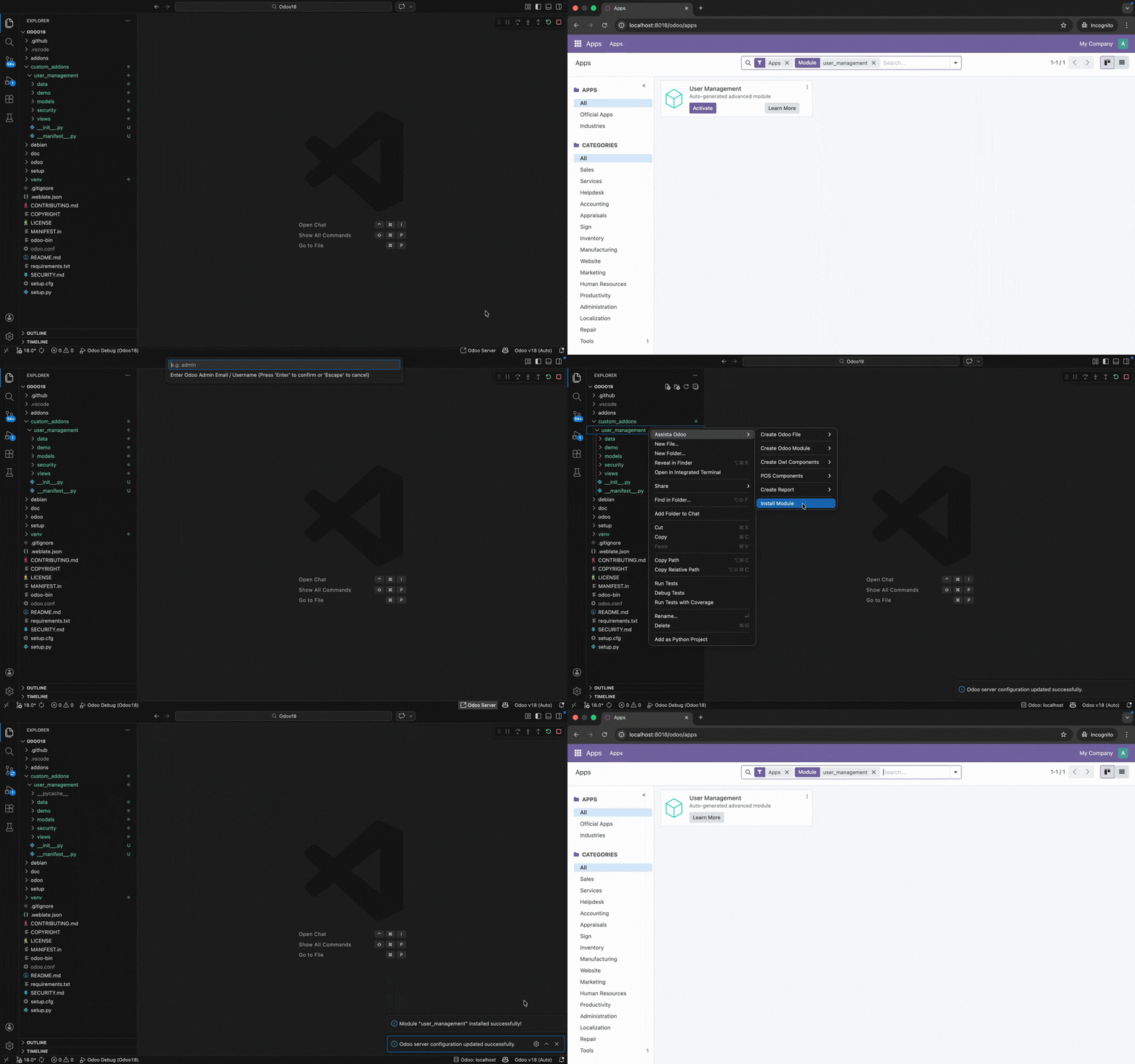
- Look at the Bottom Panel (Status Bar) of VS Code and click on the Odoo Server option.
- A prompt will appear asking for the following details:
- Server Address: The URL of your Odoo instance (e.g.,
http://localhost:8069). - Database Name: The name of the database you are working on.
- Username: Your Odoo login email or username.
- Password: Your Odoo login password.
- Server Address: The URL of your Odoo instance (e.g.,
Once these details are entered, Assista will establish a connection to your server.
Installing and Upgrading Modules
After setting up the connection, you can manage your modules directly from the File Explorer:
- Right-Click on the folder of the module you want to manage.
- Select Assista Odoo -> Install Module.
What happens next?
The tool will automatically search for your module on the connected server:
- If the module is NOT installed: Assista will ask for your permission to install it. Once you allow it, the module will be installed on your Odoo instance.
- If the module IS already installed: The tool will ask if you want to Upgrade the module to apply your latest code changes.
This process removes the need to manually go to the Odoo Apps menu, search for your module, and click install or upgrade in the browser.
Why is this useful?
This feature simplifies your development cycle by automating the deployment of code changes:
- Save Time: Skip the manual steps of searching for modules in the Odoo web interface.
- Immediate Feedback: Quickly apply changes to your Odoo instance and see the results instantly.
- Direct Control: Manage your Odoo server actions from the same place you write your code.
Note: Ensure your Odoo server is running and accessible from your computer before attempting to connect.