

Odoo Marketplace
The Odoo Marketplace is an integrated portal for the discovery and installation of Odoo community modules. It automates repository acquisition and dependency management by correlating module metadata with their respective technical requirements.
Technical Capabilities
The Marketplace interface is located in the activity bar and provides direct access to extensive module repositories.
1. Module Discovery Engine
Users can search across 20,000+ modules utilizing multi-parameter filtering.
- Integrated Repositories: Indexed access to the OCA (Odoo Community Association) and Cybrosys module libraries.
- Filtering Parameters:
- Technical Name/Title: Literal string matching for module identification.
- Odoo Version: Select compatibility filters ranging from version 12.0 to the current development releases.
- Publisher/Category: Scope results by organization (e.g., OCA) or functional domain (e.g., Accounting).
- Metadata Previews: Access to versioning, licensing, and authorship data prior to local acquisition.
2. Recursive Dependency Resolution
Assista IDE automates the detection of technical dependencies defined in Odoo module manifests.
- Depth Analysis: Identifies multi-level recursive dependencies within the module's dependency tree.
- Synchronized Acquisition: Downloads the primary module along with its validated dependency stack into the target addons directory.
- Namespace Verification: Checks for existing naming conflicts within the local workspace to prevent duplicate dependencies.
Operation & Workflow
To acquire and integrate modules, follow the standardized discovery and installation procedure.
1. Search & Filtering
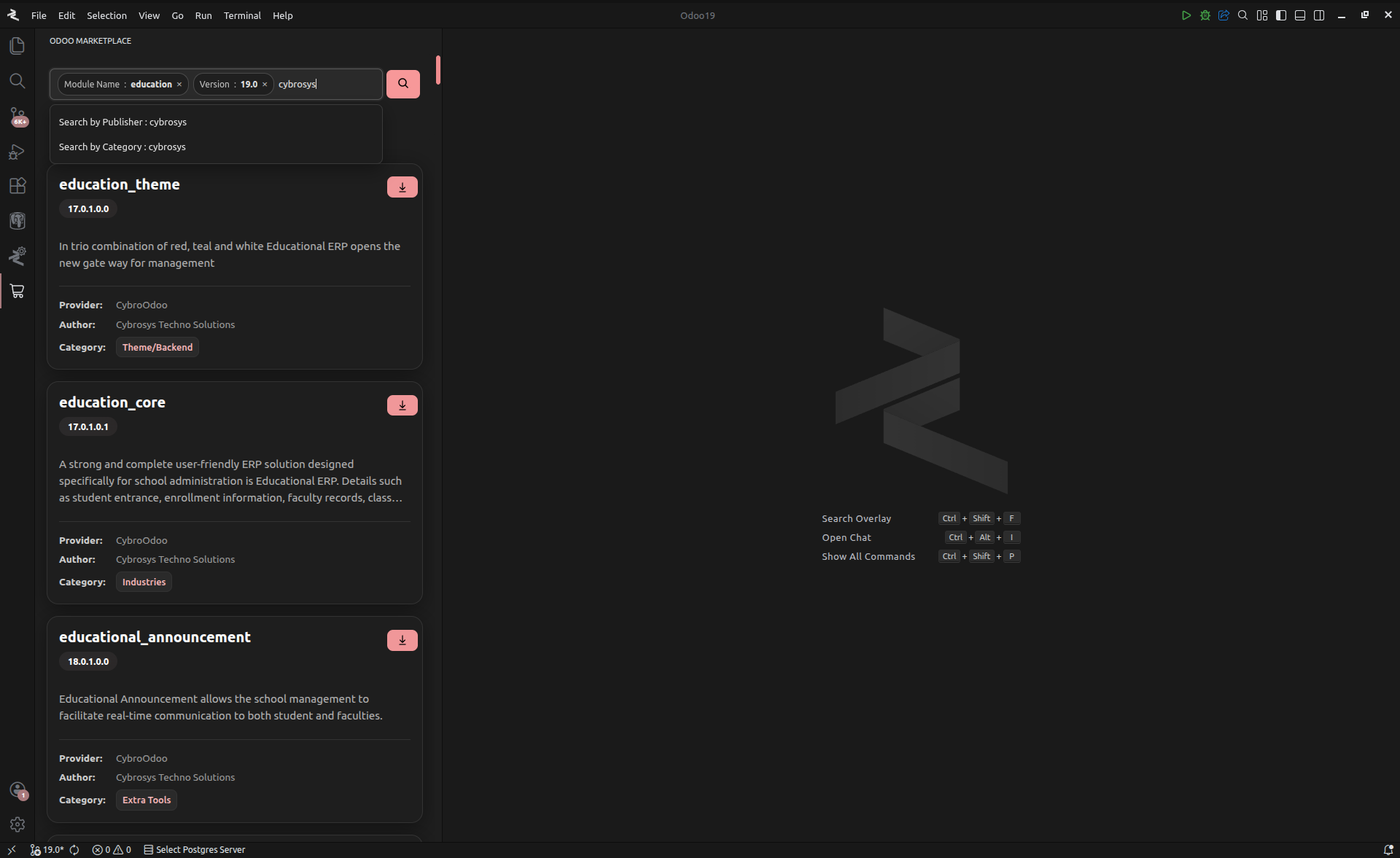
The search interface utilizes tag-based filtering to isolate specific modules.
- Access: Select the Odoo Marketplace icon in the activity bar.
- Query Entry: Input the search term in the primary query field.
- Tag Implementation: Selected filters (Version, Publisher, Category) are applied as removable tags. Multiple tags can be combined to refine the result set.
- Execution: Click Search to populate the module results.
2. Module Analysis
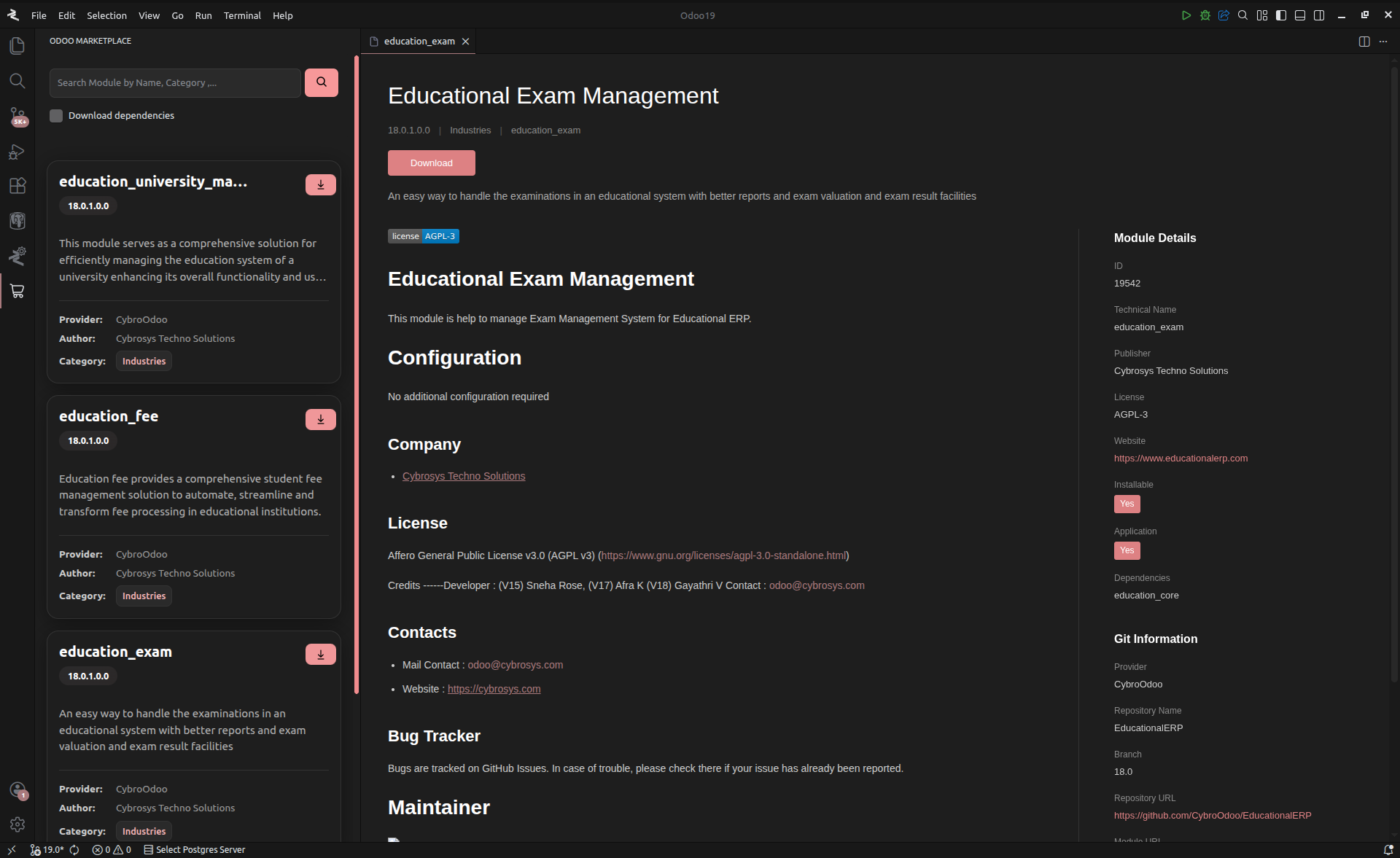
Selecting a module card opens a technical preview tab within the editor area for detailed analysis.
- Technical Specifications: Displays administrative metadata (License, Category, Version).
- Documentation (README): Renders the module's README.md for installation and functional instructions.
- Dependency Map: Lists the technical dependencies identified by the resolution engine.
- External References: Provides direct hyperlinks to the GitHub Repository, specific module path, and the provider's technical website.
3. Acquisition & Installation
The installation process maps module data to the local file system.
- Initialization: Trigger the download via the Download icon on the module card or the preview tab.
- Path Mapping: Define the destination directory for the module files.
- Dependency Acquisition Toggle: Ensure the Download Dependencies flag is enabled to trigger the recursive resolution and download of the entire stack.
- Optimized Download Protocol: The engine utilizes an extraction method optimized for GitHub, minimizing data overhead and storage footprint.
System Prerequisite
Git must be configured on the host system to enable the secure cloning and acquisition of module repositories.
Addons Configuration
Ensure the download destination is included in the addons_path variable of your active odoo.conf. This can be managed via the Odoo Configuration Editor.
The Odoo Marketplace is designed to standardize the integration of community contributions into professional development environments.